
Rancho Cordova Rental Property Online Payments and Receipts

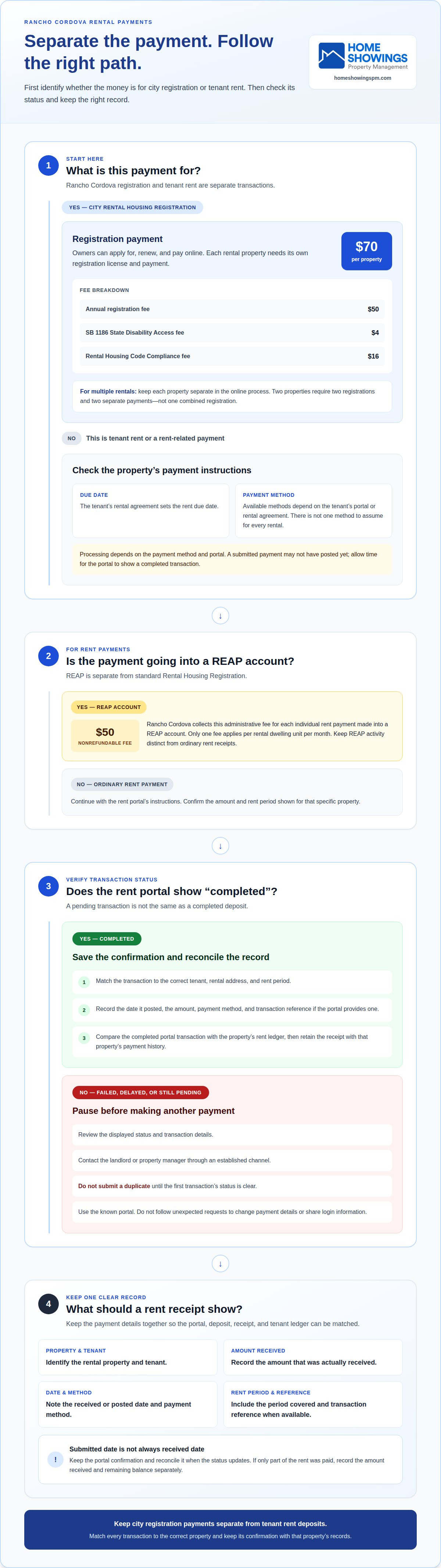
Online payments for a Rancho Cordova rental involve two separate tasks: paying the city’s Rental Housing Registration fee and collecting rent from tenants. Owners can apply for, renew, and pay for registration online, and each rental property needs its own registration and payment. The total registration fee is $70 per property.
Keeping city fees, tenant rent deposits, and payment receipts organized can make rental administration easier to follow. This guide explains how Rancho Cordova rental property online payments fit into registration applications and renewals, what the registration fee includes, and how to keep clear records of rent payments.
You’ll also learn how to distinguish city registration payments from tenant rent collection and receipts, so each transaction is recorded in the right place. Whether you manage one rental or several, understanding these steps can help you keep the payment process orderly and your records easy to review.
Table of Contents
Online rental registration applications, renewals, and payments
Rancho Cordova lets property owners apply for, renew, and pay for Rental Housing Registration online. Each rental property requires its own registration license and payment.
A Rental Housing Registration is the city’s license for an individual rental property. The annual fee was $50 per registration beginning July 1, 2020. Each registration also includes a $4 SB 1186 State Disability Access fee and a $16 Rental Housing Code Compliance fee. Together, those charges make the total registration fee $70.
For an application or renewal, keep each property’s registration separate in the online process. This makes it easier to match each payment to the correct rental address. For example, two rental properties require two registrations and two separate payments, not one combined registration.
A REAP account is separate from standard Rental Housing Registration. For each individual rent payment made into a REAP account, Rancho Cordova collects a nonrefundable administrative fee of $50.00. Only one fee applies per rental dwelling unit per month.
Accepted Online Rent Payment Methods
An accepted online rent payment method is an option enabled by the tenant’s payment portal or rental agreement. The available choices depend on the system handling that tenancy, so there isn’t one method to assume for every Rancho Cordova rental. Before paying, use the payment instructions provided for that specific property and confirm the amount and rental period shown.
Rent Due Dates and Processing Times
The rent due date is set in the tenant’s rental agreement. Processing time depends on the payment method and portal, so submitting a payment does not necessarily mean it has posted immediately. Allow time for the portal to show a completed transaction and keep the confirmation. Follow the agreement and portal instructions for when to submit rent.
Failed or Delayed Online Payments
A failed or delayed payment has not appeared as completed in the rent portal. Review the displayed status and transaction details, then contact the landlord or property manager through an established channel. Avoid submitting a duplicate until the first transaction’s status is clear. For security, use the known portal and do not follow unexpected requests to change payment details or share login information.
Landlord Acceptance of Online Rent
Landlords can accept online rent by giving tenants access to a designated payment portal and clear instructions for the property. The portal should connect each payment to the correct rental account and provide a transaction record the tenant can keep. Explain where to submit rent, how to check its status, and how to report a problem. For multiple properties, separate account records help keep rent activity organized.
Tenant rent deposits and receipts
A rent deposit is a tenant’s payment recorded against a rental account. A receipt is the written or digital record showing that payment was received. Keeping these details together helps connect a bank deposit, portal transaction, and tenant ledger without confusing rent with Rancho Cordova registration payments.
Match each incoming transaction to the correct tenant, rental address, and rent period. For example, if a portal shows a payment for an apartment, record the date it posted and the period it covers. If a deposit combines rent from different units, separate the amounts in the property records so each account reflects the correct payment.
A useful receipt identifies the property, tenant, amount received, date, payment method, and rent period. Include a transaction reference when the portal provides one. These details help distinguish payments of the same amount, such as rent for consecutive months. Save the receipt in the same digital folder or account as that property’s payment history.
For online transactions, distinguish the date a tenant submitted payment from the date it appeared as received. A pending transaction is not the same as a completed deposit. Keep the portal confirmation, then reconcile it with the property’s rent ledger when the status updates. If the tenant paid only part of the amount due, record the amount received and remaining balance separately rather than marking the full rent as paid.
Match: Connect the payment to one tenant, property, and rent period.
Record: Note the posted date, amount, method, and transaction reference.
Reconcile: Compare the completed portal transaction with the rent ledger.
Retain: Store the receipt with that property’s other payment records.
If a tenant disputes a payment, these records give both sides a clear starting point. Compare the receipt date and transaction reference with the portal status and account ledger. For example, a submission confirmation without a completed status can explain why the deposit does not yet appear in the received-rent record.
Consistent records also help owners review rent activity across separate properties. An owner and tenant portal can keep payment information and related account records organized in one place. For rental administration that includes owner and tenant portals, a centralized record can make it easier to follow each deposit from submission through receipt.
For properties affected by Rancho Cordova’s REAP, keep REAP account activity distinct from ordinary rent receipts while preserving related records. In Rancho Cordova, the director must provide the landlord and tenants with a periodic report on REAP account activity at least once a month. The director must issue an order granting or denying a request to remove a building from REAP within 30 days of receiving it. Store relevant notices and orders with the property’s administrative documents so a rent ledger is not mistaken for a REAP account report.
If a dwelling is determined to be untenantable, the director must notify the landlord, tenants, interested parties, and people who requested notice in writing of eligibility for REAP within 10 working days after determining a dwelling is untenantable. Rancho Cordova’s REAP rules cite California Civil Code Section 1954 concerning a tenant’s refusal to allow the landlord reasonable entry. Keeping these items separate from payment receipts can help clarify what each record documents.
Which property management companies in Rancho Cordova offer online rent payments?
A property manager offering online rent payments gives tenants a digital way to submit rent for a managed home. For a Rancho Cordova rental, the practical question is whether online payments are enabled for that specific property.
Payment access depends on the management arrangement and the property’s payment instructions. Tenants should use the portal and process identified for their rental. The property manager’s name alone does not tell you how to submit rent, which methods are available, or where payment records appear.
To identify the right process for a Rancho Cordova rental, start with the lease and payment instructions for that home. Look for the tenant portal name, account setup steps, payment options, and where completed transactions appear. Follow the property-specific instructions rather than sending rent to an unfamiliar account.
For a property owner comparing management approaches, distinguish rent collection from general online communication. A portal may provide messages or documents without accepting rent. Confirm that rent payment is part of the rental workflow and understand how incoming transactions are recorded. This helps prevent confusion between a payment receipt and a general account notification.
For example, an owner reviewing management proposals can compare the described rent process: tenant access, payment submission, transaction records, and how payment issues are handled. Focus on the actual process for a managed property, not an assumed feature based on a company’s name or general technology claims.
Tenant: Use payment instructions tied to the specific rental and lease.
Owner: Ask how online rent is collected and recorded within management.
Both: Keep the portal’s transaction record with the property’s rent history.
Online payment access also depends on a clear handoff. The tenant needs the correct account and instructions, while the manager needs to connect each transaction to the right property and rent period. When a tenant moves into a Rancho Cordova home, the portal invitation and payment guidance should identify that rental clearly. A property manager’s rent collection process should make these steps understandable before the first payment is due.
Look for a property manager that provides a defined online rent process for the specific home. Key details include portal access, payment submission, transaction tracking, and a clear way to resolve payment questions. These practical steps say more than a general claim about offering online services.
What tenant portals are used for Rancho Cordova rentals?
A tenant portal is an online account that connects a renter with information and services for a specific rental. In Rancho Cordova, use the platform identified in the property’s management arrangement, lease, or welcome instructions. A city registration payment site and a tenant rent portal serve different purposes.
Portal names and layouts can differ between properties, even within the same city. Start with the account invitation or written instructions for your rental, then confirm the property address and account holder before entering payment details. For example, a portal showing a different unit or former tenant could attach records to the wrong rental.
A tenant portal can provide a central place to view rental account information, but its tools depend on the management setup. For Rancho Cordova rental property online payments, look for a clearly identified rent payment function, transaction history, receipts, or messages. Do not assume every portal has the same features. The payment function should be distinct from a general message or document area.
Once you receive access, set up your account carefully. Open the invitation through the expected channel, match the rental address, and create credentials directly in the portal. Locate its rent section and review the instructions before submitting payment. If the page shows an amount or property that does not match your lease, pause and contact the property manager through an established channel.
Identify: Find the portal named in the rental instructions.
Match: Confirm the account displays your Rancho Cordova rental.
Review: Locate rent payment and transaction records before paying.
Save: Keep the confirmation or receipt with your rental records.
For owners, a portal is useful when it helps connect payment information to the correct property and tenant. A clear account structure helps distinguish rentals and track each transaction. During a management handoff, payment instructions should identify the active portal and explain where tenants can view their account records. An old login may no longer reflect current payment arrangements.
Tenants should treat portal access as sensitive account access. Use the portal identified in official rental communications, and do not share passwords or payment credentials through unexpected messages. If an email asks you to switch accounts or use new payment details, verify the change through a previously established contact method. Familiar portals and consistent instructions help keep Rancho Cordova rental property online payments separate from city registration transactions.
Which payment methods are accepted for online rent in Rancho Cordova?
An accepted payment method is an option enabled for rent through a rental’s designated portal. Rancho Cordova does not have one universal online rent method for every property. The available choices depend on the portal and payment setup for that rental. Follow the lease or property-specific instructions rather than assuming a method works everywhere.
Start with the payment page linked to your rental account. It should show the available methods before you submit rent. If the portal lists one method, do not assume another payment type will work through the same account. Follow the property manager’s instructions and the options displayed in the portal.
Keep the payment purpose clear. Rent submitted through a tenant portal is different from a city Rental Housing Registration payment. The city allows registration applications, renewals, and payments online, but that process does not establish which methods a landlord accepts for tenant rent. Use the account associated with the transaction you intend to make.
Before selecting a payment option, review the screen for the rental address, tenant account, rent period, and total due. Confirm that the portal identifies the transaction as rent, then follow its steps and keep the confirmation. If the listed method does not suit your situation, contact the property manager through the established channel before trying another route.
Use the right account: Open the portal associated with your specific rental.
Review the choices: Read the methods shown on the payment screen.
Match the transaction: Confirm the address and rent period before submission.
Save the record: Keep the portal confirmation with your payment history.
Owners setting up online rent collection should explain the accepted method in tenant instructions. Direct tenants to the correct portal and explain where its payment options appear. If the process changes, clear communication helps prevent payments through outdated instructions or an unrelated account.
If a payment appears pending or fails, check the portal status before trying again. A second submission could create a duplicate if the first transaction is still processing. Keep the confirmation or error message, then contact the property manager through a known channel. Do not follow unexpected messages requesting new payment details.
To make rent collection and payment instructions part of a coordinated rental process, explore property management support for your rental.
Home Showings Property Management: Rental Marketing
Home Showings Property Management connects rental marketing, tenant placement, and ongoing rent collection for owners in Rancho Cordova and nearby communities, including Elk Grove and Sacramento. Rental Marketing helps present a property to prospective renters, while Tenant Screening supports the selection process.
Once a tenant is in place, Property Management and Rent Collection help coordinate the ongoing rental process. This is useful when you want marketing, screening, and rent administration handled as connected responsibilities rather than separate tasks.
For help with your rental, contact Home Showings Property Management.
Make Your Next Rental Decision with a Clear Plan
When considering Rancho Cordova rental property online payments, think about how payment records fit into your broader ownership routine. A consistent process helps connect tenant communication, leasing decisions, and rental income administration instead of treating each as an isolated task.
When preparing a home for its next tenant, Home Showings Property Management can support the process through Rental Marketing and Tenant Screening. For owners seeking help beyond leasing, Property Management brings ongoing rental responsibilities together. The right next step depends on the support you want and where you’d like to focus your time.
Explore how these services could fit your rental goals, then decide what kind of support makes sense for your property. Contact Home Showings Property Management to discuss your rental needs. A thoughtful plan can make the next stage of ownership feel more manageable.
Frequently Asked Questions
How can tenants pay rent online for Rancho Cordova rental properties?
Tenants can pay rent through the online tenant portal provided for their rental. Home Showings Property Management uses Rentec for online rent collection, including for managed rentals in Rancho Cordova. Sign in through the portal, select the rent payment area, and follow the account instructions. Keep the transaction confirmation after submitting payment. For rentals in nearby Elk Grove or Sacramento, use the portal linked to that specific property.
How can tenants set up recurring rent payments for a Rancho Cordova rental?
To set up recurring rent, sign in to the rental’s Rentec tenant portal and look for a scheduled or automatic payment option. If available, follow the portal prompts and review the payment amount and schedule before saving. Check the account afterward to confirm the instructions appear as expected. If the portal does not show a recurring payment setting, use its regular payment process and contact the property manager for guidance on that account.
Comments